Trojans account for 58 percent of all malware circulating online, according to AV-TEST data. That is not a rounding error. With over 450,000 new malware samples appearing daily and banking trojans surging 56% through 2025, your odds of encountering one have never been higher.
A trojan disguises itself as legitimate software to trick you into running it, then opens the door for theft, surveillance, or deeper infection. The best trojan removal tools catch what generic antivirus misses. Automated scanners achieve a 94% removal success rate compared to just 60% for manual cleanup. That gap matters when your banking credentials are on the line.
Watch for these warning signs of a trojan infection:
- Unexplained slowdowns and high CPU or RAM usage
- Random pop-ups or browser redirects
- Programs you never installed appearing on your system
- Antivirus software disabled without your input
- Unusual outbound network traffic
We tested eight tools across detection accuracy, trojan type coverage, system performance, pricing, and ease of use. Here are the results.
MalwareFox Anti-Malware
MalwareFox earns a 4.6 on Softonic and 4.7 on Trustpilot, putting it among the highest-rated anti-malware tools available. Users consistently praise it for one thing: it finds trojans that other scanners miss.
The detection engine runs three layers in parallel. Signature matching catches known threats. Heuristic analysis flags suspicious code patterns. Behavioral monitoring watches running processes for trojan-like activity in real time. This layered approach catches new, unrecognized trojans even before signature databases update.
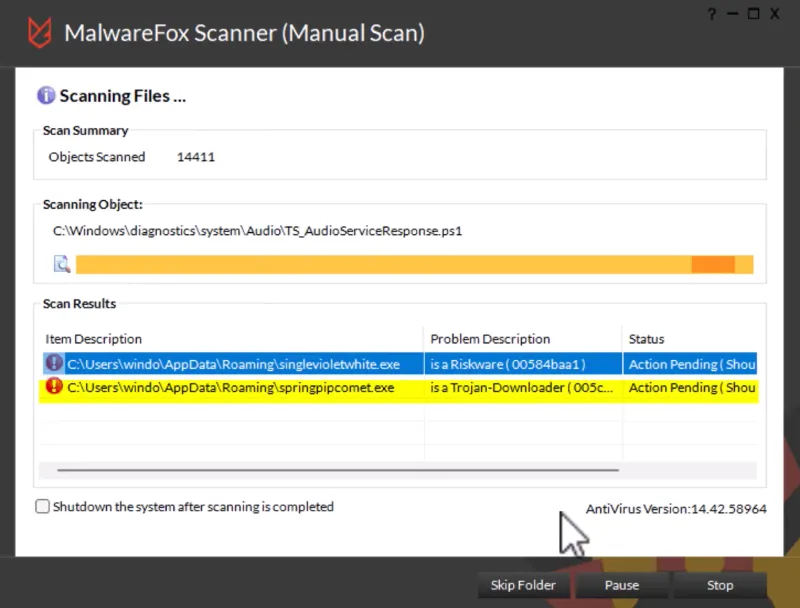
Trojan type coverage spans the threats most users actually encounter:
- Rootkits that embed themselves deep in your operating system
- Banking trojans that steal credentials from financial apps
- RATs (remote access trojans) that give attackers full control of your PC
- Downloaders that silently fetch additional malware
- Ransomware variants that encrypt your files for payment
Your PC stays fast while all of this runs. MalwareFox consumes minimal resources and works quietly in the background. The built-in browser cleaner strips out hijackers and adware extensions that often accompany trojan infections. You also get a firewall and parental controls, so the protection extends beyond just malware.
If your PC is acting strange and you suspect a trojan, MalwareFox is the first tool we recommend installing.
Download MalwareFoxBest for: Users who need fast, lightweight trojan removal with real-time protection and don’t want to overpay. Skip if: You specifically need a bundled VPN. MalwareFox covers malware, firewall, and parental controls but does not include a VPN.
Malwarebytes Premium
There is a common misconception that the free version of Malwarebytes protects you from trojans in real time. It does not. The free tier is a scan-and-remove tool only, with zero real-time blocking. Any trojan that lands between manual scans runs undetected until you remember to click “Scan.”
The Premium version tells a different story. Its Hyper Scan behavior engine monitors system activity continuously, flagging trojan behavior patterns before damage occurs. Malwarebytes Premium catches banking trojans, adware bundles, and PUPs (potentially unwanted programs that blur the line between annoying and malicious) with strong accuracy.
Where Malwarebytes falls short is rootkit detection. Deep-embedded trojans that hide within OS processes are harder for Malwarebytes to catch compared to MalwareFox, which was purpose-built for those threats. If rootkits are your primary concern, this matters.
Pricing ranges from $44.99 per year for a single device to $149.99 for a five-device family plan. Resource usage is moderate. The interface is clean and beginner-friendly, which counts for something when you are dealing with a stressful infection.
The verdict: A solid number two. The Premium tier genuinely protects against most trojans. But the free version alone will not cut it, and the price gap versus MalwareFox is hard to justify for trojan-specific protection.
Bitdefender Total Security
Independent lab tests from AV-TEST and AV-Comparatives consistently give Bitdefender a 100% malware detection rate. No other tool on this list matches that specific credential across multiple consecutive testing cycles.
Bitdefender’s cloud-based scanning offloads heavy analysis to remote servers, keeping your local system fast during scans. Its Advanced Threat Defense module uses machine learning to monitor every running application for trojan-like behavior. When it spots something suspicious, the process gets sandboxed (isolated in a virtual container) before it can cause damage.
Trojan coverage runs deep. Bitdefender catches rootkits, RATs, banking trojans, downloaders, and fileless trojans (malware that lives entirely in memory without writing files to disk, making it invisible to traditional scanners). That fileless detection is a genuine differentiator. Many competing tools still struggle with memory-resident threats.
The platform supports Windows, macOS, iOS, and Android under a single license. Pricing lands around $49.99 per year for up to five devices. You get a firewall, parental controls, a VPN, and webcam protection alongside the trojan scanner. The downside: this is a full suite whether you want one or not.
Quick comparison vs MalwareFox: Bitdefender costs roughly 2.5 times more. You get a complete security suite with perfect lab scores. MalwareFox costs less and focuses exclusively on malware and trojan removal without the extra bulk. Choose based on whether you need everything or just the trojan protection.
Norton 360
Think of Norton 360 as the Swiss Army knife of security. It does everything, but that coverage costs you, both in dollars and system resources.
Norton’s SONAR behavioral analysis technology monitors system activity for trojan patterns using artificial intelligence. In independent testing, it achieved 100% detection of zero-day threats (brand-new malware never seen before). Norton catches banking trojans, RATs, rootkits, downloaders, and polymorphic trojans that mutate their code to avoid detection.
Beyond trojan removal, the suite bundles a VPN, dark web monitoring for leaked credentials, a password manager, cloud backup storage, and identity theft protection. For users who want a single subscription covering all security needs, Norton consolidates everything into one dashboard.
Pricing starts at $49.99 per year for the base plan and climbs to $109.99 for Norton 360 with LifeLock. Resource usage is the other trade-off. Norton runs heavy. Older PCs will feel the drag during scans and even during idle background monitoring. On modern hardware with 8GB or more RAM, the impact is manageable but still noticeable compared to lighter tools like MalwareFox or ESET.
Best for: Users who want an all-in-one security platform and have a modern PC that can handle the resource load. Skip if: You only need trojan removal. You would be paying for a dozen features you will never open.
Emsisoft Anti-Malware
Picture this: your PC is so heavily infected it will not boot past the login screen. Your antivirus is disabled, and Safe Mode crashes after ten seconds. This is exactly when Emsisoft’s Emergency Kit earns its reputation.
The Emergency Kit is a portable, free tool that runs from a USB drive. No installation required. You plug it into the infected machine, boot from USB, and run a full scan outside the compromised operating system. For worst-case trojan scenarios, this capability is unmatched on our list.
Emsisoft’s main product runs a dual-engine scanner combining its proprietary detection technology with Bitdefender’s engine. Two scanning engines means broader signature coverage and fewer missed threats. The Behavior Blocker module watches running processes for trojan activity patterns, catching threats that slip past both signature databases.
Trojan coverage includes PUPs, adware-bundled trojans, banking trojans, and polymorphic variants. Pricing sits around $29.99 per year, placing it between MalwareFox and the premium suites.
The verdict: Emsisoft is the rescue tool for worst-case scenarios. The free Emergency Kit alone makes it worth keeping on a USB drive, even if you use another tool day-to-day.
Avast Free Antivirus
Avast offers the strongest free trojan scanner available. But “free” comes with a trade-off you should understand before installing.
Avast’s CyberCapture technology uploads suspicious files to a cloud sandbox for deep analysis. When it encounters an unknown file that behaves like a trojan, the file gets quarantined while cloud servers dissect it. This gives Avast detection capabilities that rival paid tools for known and emerging trojan variants. The scan engine handles banking trojans, downloaders, adware trojans, and most common RAT variants effectively.
Now the trade-off. In 2020, Avast’s subsidiary Jumpshot was caught selling anonymized user browsing data collected through Avast products. Avast shut down Jumpshot and overhauled its data practices. The company has since been acquired by Gen Digital (parent of Norton). Whether those changes satisfy your privacy standards is a personal call, but the history is worth knowing.
The free tier includes real-time scanning, which puts it ahead of free Malwarebytes. Resource usage is moderate, heavier than MalwareFox or ESET but lighter than Norton.
Direct recommendation: Zero budget? Avast works well for trojan detection. Can you spend $24 per year? MalwareFox delivers comparable detection without the privacy baggage.
Sophos Home Premium
Managing security for your entire household usually means installing and configuring software on every device individually. Sophos Home Premium lets you manage up to 10 devices from a single web dashboard, remotely. You can run scans, adjust settings, and review threats on your kid’s laptop from your phone.
This remote management capability comes from Sophos’s enterprise DNA. SophosLabs processes threat intelligence from millions of business endpoints worldwide, feeding that data into an AI and deep learning engine that powers the consumer product. You get enterprise-grade detection technology at consumer pricing.
Trojan coverage focuses on web-delivered threats. Sophos excels at URL blocking and web filtering, catching trojans embedded in phishing pages and malicious downloads before they execute. It handles downloaders, banking trojans, and zero-day variants effectively.
Pricing is roughly $44.99 per year for up to 10 devices. On a per-device basis, that is outstanding value for families.
Best for: Families and households with multiple devices that need centralized security management. Skip if: You are a single-PC user. The multi-device management is the primary value, and it is wasted on one machine.
ESET NOD32 Antivirus
Running an older PC that chokes on full security suites? ESET was built for that. In independent benchmarks, NOD32 consistently ranks as the lightest antivirus scanner available, using fewer CPU cycles and less RAM than every other tool on this list.
ESET’s ThreatSense heuristic engine combines multiple detection methods (signature matching, code emulation, DNA-based detections, and machine learning) into a single scanning pass. This efficiency is how ESET keeps resource usage low without sacrificing detection quality. The engine catches fileless trojans, script-based attacks (trojans delivered through PowerShell or JavaScript), and downloaders with solid accuracy.
One standout feature is the UEFI scanner. UEFI is the firmware that loads before your operating system starts. Rootkit trojans that embed themselves in UEFI firmware survive operating system reinstalls and even hard drive replacements. ESET is one of the few consumer tools that actively scans this layer. A dedicated gamer mode suppresses notifications and reduces background activity during fullscreen applications.
Pricing lands around $39.99 per year with a 30-day free trial, one of the longest on this list.
The verdict: Best for aging hardware and resource-constrained systems. ESET will not match Bitdefender’s perfect lab scores, but it barely touches your system resources. For older PCs where every megabyte of RAM counts, NOD32 is the clear choice.
Look for unexplained CPU or RAM spikes during idle periods, random pop-ups or browser redirects, programs you did not install, disabled antivirus software, and unusual outbound network traffic in Task Manager. Trojans represent 51 to 58 percent of all malware, so these symptoms more often point to a trojan than any other threat. Run a full scan with a dedicated tool to confirm.
Yes, but manual removal achieves only a 60% success rate compared to 94% for automated tools. Trojans scatter components across multiple directories and create redundant persistence mechanisms. Miss one piece and the trojan reinstalls on reboot. Use a dedicated removal tool for reliable, thorough cleanup.
Banking trojans steal financial credentials and surged 56% year-over-year in 2025. RATs (remote access trojans) give attackers full control of your PC, including webcam and files. Rootkits hide deep in your OS or firmware, evading standard scanners. Downloaders silently fetch additional malware after initial infection. Ransomware trojans encrypt your files and demand payment for decryption.
Free tools detect and remove existing trojans during manual scans, but most lack real-time protection. Free Malwarebytes has zero real-time blocking. Avast Free includes it but carries privacy history. For $24 per year, MalwareFox adds continuous real-time monitoring. Prevention is always cheaper than recovery, especially when banking trojans are involved.
1. Disconnect from the internet to stop communication with command servers.
2. Boot into Safe Mode (hold Shift while clicking Restart, then select Safe Mode).
3. Run a full system scan with a dedicated tool like MalwareFox.
4. Quarantine and delete all detected threats.
5. Restart and run a second scan to confirm complete removal.
Most trojans do not survive a factory reset. However, rootkits and UEFI firmware trojans embed themselves in areas a reset does not touch. MalwareFox includes rootkit removal capabilities, and ESET NOD32 offers a UEFI scanner for firmware-level threats. Use these targeted tools before resorting to a factory reset that may not solve the problem.
I have been using the premium version of Malwarebytes on my computer for quite a long time now. I find it really effective and easy to use.
Recently I was doing some research to write an article on my blog about best antimalware tools. Then I came across Malwarefox.
After using it I have to say it is quite impressive.
Do check my thoughts on MalwareFox.
Once again really nice blog on security. Going to subscribe
Thank you Ashish for featuring MalwareFox in your blog post.
Check out your email inbox for a surprise from us 🙂
Hey Shawn.
Thank you for such a considerable gift. I am surely gonna mention more about MalwareFox in the future. I was planning to write a post about it.
Thank you so much 🙂
it may delete the emotet viruses?
WOW. I have tried so many other antivirus softwares, none of which were able to get rid of the Trojan. I just read this page, hoping to find a tool to help me. I downloaded Malwarefox and that was the best thing i could’ve done to get my PC back on track. I ran the lightweight program and it completely took it out. Thank You Malwarefox!
With the rise of malware affecting more and more users, computer security and personal vigilance are more important than ever before. It’s best you reach out to blackrock consult pro and hire an expert for top firewall security, database/fund recovery (if you have been hacked or scammed) and stealth investigation services for individuals and institutions based on preferences and requests.
Downloaded today ,scanned all my browsers and system files and integrity of windows.
Gives you detailed information about it finds, I really liked the way it scans.
I recommend malwarefox. Try it ,you will have a 15 day free trial.
mam paskudnego trojana skacze desktop pulsujace punktu parodia internetu okropieństwo.
And what you want most right now? I think you still need time to rest, there is a small suggestion for you to try the krunker you will feel more comfortable with. Have a good day!
I don’t see “GridinSoft” here? You may get to know it.
They found endless amount of Trojans, along with a lot of other crap that the others completely missed!!! Actually back in the day when my mums browsers got hijacked all these blow up fish couldn’t resolve it either, and that is how I discovered “GridinSoft” in the first.
I have “Malwarebytes” installed – Missed everything
I have “GridinSoft Anti-Malware” – Missed everything
I have “Trojan Killer Portable Edition” – Boom 100 threats 50%+ Trojans including untouched compressed files.
I Have A Constant Pop-Up By The Name Of EUMOAR.CN & Serial Number For This TROJAN That Malwarebytes Found,Tried Cleaning My WIN-10 WorkStation By Lenovo With It And Malwarebytes Does Not Solve It ”Just Shows It Repeatedly Popping-Up” Did A %TEMP% & temp & Disk Cleaner Yet It’s Still There Deep In SoMe Deep File In Some ‘ C-Drive’ . As I ”Show All Folders Too I Cannot Find Where It’s Located But All Has Gone Quite” It Has Did Something To Prevent This TROJAN … EUMOAR.CN….Beware People As It’s A Repeater File Unless Found Only Loads – Up In Malwarebytes As No 2 Malware Programs Can Work Together Although I Always Just Use NINITE.COM .Mainly For Safe Browsers & Malwarebytes to Gimp Or Codecs Or Flash to .NET ,& MANY MANY MORE…..How Do I Rid This EUMOAR.CN As It Goes It’s Now Stopped & Back To M/BYTES Does Do It”s Job But Going To Try This FOX VERSION ”Look’s So Good With Amazing Results That Go Deeper To KILL TROJANS THAN MOUNTING THEM UP IN BYTES”…..THANKS SO MUCH MY WORKSTATION IS FLYING 10/10