Banking trojans on Android surged to 255,090 unique packages in 2025. That is a several-fold increase over the previous year, and your phone is now the primary target for malware, not your PC.
Android controls 70% of the global mobile market, which makes it the primary target by design. Security researchers recorded over 14 million mobile attacks in 2025 alone. Banking trojans, stalkerware, and fake apps are engineered specifically for Android’s open ecosystem, where sideloading APKs and unverified app stores create attack surfaces that simply do not exist on more locked-down platforms. If your phone runs Android, it is being targeted.
Most “best antivirus for Android” lists recommend apps that were caught selling user data or bury renewal prices that jump 4-5x after the first year. We ranked 6 Android antivirus options on three criteria: protection scores, privacy practices, and honest long-term pricing. Here are our picks for 2026.
1. MalwareFox – Best for Privacy-Conscious Android Users
Most antivirus apps ask for the same invasive permissions as the malware they claim to block. MalwareFox takes the opposite approach: strong protection, zero data trading, and a price that stays the same at renewal.
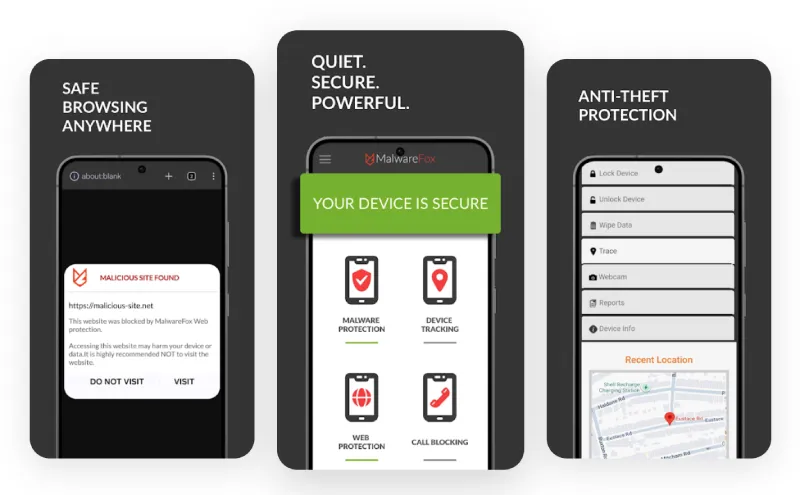
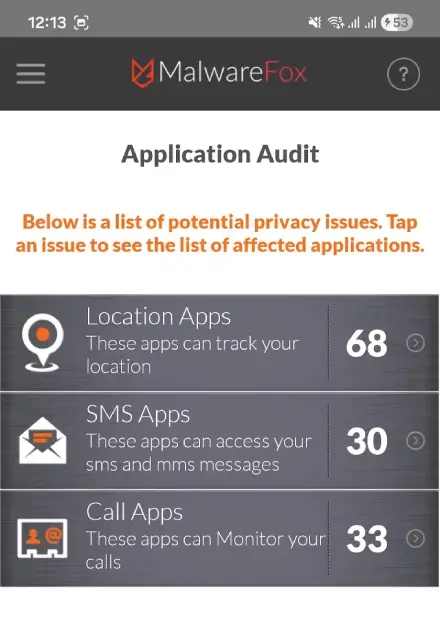
The standout feature is the Application Privacy Audit. It shows exactly which apps on your phone are accessing your camera, microphone, location, and messages. No other antivirus on this list offers anything like it. You get a clear map of which apps are abusing permissions, so you can revoke access or uninstall them before damage is done.
MalwareFox’s Deep Antivirus & Spyware Scanner catches threats that other apps miss. It pairs with Web Protection to block phishing pages and malicious links in real time. The Anti-Theft suite lets you locate, lock, trigger an alarm, or wipe your device remotely if it is lost or stolen. A built-in Call & SMS Blocker handles spam calls and text filtering.
MalwareFox carries a 99.3% lab protection score and has blocked over 5 million threats to date. Battery drain is a dealbreaker for many users, especially on older phones. MalwareFox is designed for Zero Battery Drain, using less than 1% CPU. You will not notice it running. The app holds a 4.6/5 rating on the Play Store from 4,239 reviews with over 100,000 installs, and its Play Store data safety badge confirms no data is shared with third parties.
One Play Store reviewer, put it plainly: “The top 4 didn’t work for me, and it was Malwarefox, which came to my rescue. Easily the best security app for phones.” Another user, Sukces Tuber, highlighted a problem many people run into: “Its trial version is actually functional, unlike other pseudo-trials that refuse to delete any virus they find unless you pay.”
Pricing is transparent. The standalone Android plan costs $14.99 per year, purchased directly via Google Play. The 3-device plan (Windows + Android) runs $36 per year, which works out to $1 per device per month. The critical difference: MalwareFox charges the same price at renewal. No introductory bait, no year-two surprise. A 15-day free trial requires no credit card, and a 60-day money-back guarantee backs every purchase.
Best for: Users who want strong malware protection without handing their data to another advertising company. Skip if: You need a built-in VPN (MalwareFox does not include one).
2. Bitdefender Mobile Security – Best for Performance-Sensitive Users
Bitdefender scanned 150 apps in just 25 seconds during independent testing by Cybernews. That is the fastest result of any Android antivirus tested.
In AV-TEST’s January 2026 evaluation, Bitdefender scored a perfect 6/6/6 across Protection, Performance, and Usability. The Cybernews hands-on test detected 146 out of 150 malware samples, a 97% accuracy rate. Cloud-based scanning offloads the heavy work from your phone, keeping battery impact low.
Bitdefender’s App Anomaly Detection monitors app behavior after installation and flags suspicious changes. This catches threats that look clean during initial scans but turn malicious later through delayed payloads or silent updates. You also get web protection against phishing and fraudulent sites, an App Lock secured by PIN or fingerprint, and a VPN with a 200MB daily cap.
The 200MB VPN limit is too restrictive for regular use. It covers a few minutes of browsing at best. Users who need a VPN should pair Bitdefender with a standalone provider or choose a plan that includes unlimited VPN separately.
Here is the pricing catch. Bitdefender’s product page states: “The price offered is valid for the first year of subscription.” After that, the renewal price increases. The refund window is 30 days, half of what MalwareFox offers.
The verdict: Bitdefender is a strong choice if scan speed and lab-verified protection are your top priorities. Just factor in the higher renewal price before you subscribe.
3. Norton 360 – Best-Known Brand (But Watch the Renewal Price)
Norton scores a perfect 6/6/6 in every AV-TEST category. So why do informed buyers hesitate before subscribing?
The feature set is among the most comprehensive available. App Advisor scans Play Store apps before you download them. Dark Web Monitoring alerts you if your credentials appear in data breaches. Wi-Fi Security flags unsafe networks. SMS filtering catches phishing texts. Norton has decades of brand trust behind it, and the lab scores back it up.
The problem is what happens after year one. Norton 360 Premier Edition renews at $109.99 per year after a much lower introductory price. This is the single biggest gap in most “best antivirus” articles: they recommend Norton without disclosing that the price you see at checkout is not the price you will pay next year. For comparison, MalwareFox’s $24 per year stays $24 at renewal.
Norton’s heavy feature set also means heavier resource usage. Many of the bundled tools, like the VPN and dark web monitoring, overlap with standalone services you may already use. If you already run a password manager and a separate VPN, you are paying for features you do not need.
Quick comparison: Norton delivers top-tier protection and feature depth. MalwareFox delivers comparable core protection at a fraction of the long-term cost with no renewal surprise. Your priority determines the better pick.
4. Avast Mobile Security – The Free Option with a Troubled History
In December 2025, the FTC sent $15.3 million in refund payments to 103,152 Avast users whose browsing data was collected and sold without their consent.
The protection itself is solid. Avast scored a perfect 6/6/6 in AV-TEST’s January 2026 evaluation with zero false positives. The free tier is generous, which is why Avast consistently tops “best free antivirus” lists. On paper, it looks like the obvious choice for anyone who does not want to pay.
The backstory changes the picture. From 2014 to 2020, Avast used its antivirus software and browser extensions to collect detailed browsing data from millions of users. That data, including financial interests, health searches, and political viewpoints, was sold to over 100 companies through Avast’s subsidiary Jumpshot. The FTC called it a large-scale breach of consumer privacy and hit Avast with a $16.5 million settlement. Avast is now permanently banned from selling web browsing data for advertising purposes.
Multiple competitor articles still recommend Avast as the “best free antivirus” without mentioning any of this.
The broader lesson is straightforward. Free antivirus apps need a revenue model. If you are not paying for the product, your data often becomes the product. Avast’s lab scores prove the protection engine works. The question is whether you trust the company behind it after a documented, six-year data harvesting operation.
Direct recommendation: If privacy matters to you, pay for a transparent antivirus like MalwareFox ($14.99/year) instead of gambling on “free.”
5. McAfee Mobile Security – Feature-Rich but Bloated
McAfee scores perfectly in lab tests. Search any tech forum, though, and you will find a very different conversation about the user experience.
AV-TEST gave McAfee a perfect 6/6/6 in January 2026. The identity theft protection and scam detection features are useful if you want an all-in-one security suite. Scam message filtering catches SMS phishing attempts, and Wi-Fi security checks flag unsafe networks.
The downsides are well-documented. McAfee has a long-standing reputation as bloatware, largely because it ships preinstalled on many PCs and proves difficult to remove. One Reddit user in the r/antivirus community summarized the sentiment: “One of the reasons I think it’s not worth using McAfee in 2025 is because it is bloated, as it came preinstalled on some computers.” On Android, the app is heavier on resources than leaner alternatives, especially on older devices with 3-4 GB of RAM. Aggressive upselling and renewal pricing that follows the same introductory-price pattern as Norton add to the friction.
Many of McAfee’s bundled features duplicate what Android already provides natively or what dedicated apps do better. Wi-Fi security, for example, overlaps with Android’s built-in network warnings.
Best for: Users who prioritize identity theft protection in a single app. Skip if: You want lean, focused malware protection without the bloat.
6. Google Play Protect – Is Built-In Protection Enough?
Google Play Protect comes pre-installed on every Android phone. It scans apps you download from the Play Store and checks for harmful behavior. So why would you need anything else?
Because Play Protect’s scope is narrow. It focuses on apps inside the Play Store. Phishing links that arrive through SMS, WhatsApp, or email sit outside its reach. Sideloaded APKs from third-party sources are not scanned before installation. Banking trojan overlays that hijack your screen when you open a financial app are not blocked in real time. With 255,090 banking trojan packages circulating in 2025, those are not edge cases.
Play Protect also does not include features that dedicated antivirus apps offer. There is no web protection to block malicious URLs before they load. No Application Privacy Audit to show which apps are quietly accessing your camera, microphone, or location. No Anti-Theft with remote lock and wipe. No Call or SMS blocking for spam and scam filtering. It is a bouncer at one door when threats are entering through five.
Then there is the privacy trade-off that almost no competitor article mentions. Play Protect accesses your call logs, SMS messages, contacts, and location. It sends device activity data to Google’s servers. Google is, at its core, an advertising company. This data feeds into the broader ad-targeting ecosystem that generates Google’s revenue. You get limited protection, and you pay for it with personal data.
The verdict: Play Protect is a useful baseline, but it was never designed to be your only line of defense. Pair it with a dedicated antivirus that covers the gaps Play Protect leaves open.
Frequently Asked Questions
Yes. Security researchers recorded over 14 million mobile attacks in 2025, and banking trojans surged to 255,090 unique packages. Android’s open ecosystem allows threats to enter through sideloaded APKs, phishing links in SMS and messaging apps, and fake app clones. If you use banking apps, sideload APKs, or have an older phone without current security patches, a dedicated antivirus is essential.
Not on its own. Play Protect only scans apps from the Play Store. It does not block phishing links in SMS or WhatsApp, does not scan sideloaded APKs before installation, and does not offer web protection, anti-theft, or privacy auditing. It also sends your call logs, contacts, and location data to Google’s ad ecosystem. Treat it as a baseline layer, not your only defense.
Be cautious with free antivirus apps. Avast’s free tier scored well in lab tests but was caught selling user browsing data to over 100 companies, resulting in a $16.5 million FTC settlement. MalwareFox offers a 15-day fully functional free trial with no credit card required, plus a permanent free on-demand scanner after the trial ends.
Poorly designed antivirus apps can drain battery significantly, especially on older phones. . Ironically, rapid battery drain is also a common symptom of active malware running on your device. If your phone suddenly loses charge faster than usual, run a scan before blaming the battery.
Many antivirus companies use low introductory pricing to attract subscribers, then raise the price at renewal. Norton 360 Premier Edition, for example, renews at $109.99 per year after a much lower first-year price. MalwareFox charges the same price every year. $14.99 per year for one device stays $14.99 at renewal, with no hidden increases.